
acg-faka 完整安装教程(Debian 12 + PHP 8 + MariaDB + Nginx + HTTPS)
- 建站相关
- 2025-10-13
- 356热度
- 0评论
1️⃣ 系统环境准备
🧩 一、更新系统
先更新软件源与包索引:
apt update && apt upgrade -y🌐 二、安装 Nginx
apt install nginx -y🧮 三、安装 PHP(推荐 PHP 8.2)
apt install -y ca-certificates apt-transport-https software-properties-common curl
curl -sSL https://packages.sury.org/php/README.txt | bash -x
add-apt-repository ppa:ondrej/php
apt update
安装 PHP 及常用扩展:
apt install -y php8.2 php8.2-fpm php8.2-mysql php8.2-cli php8.2-curl php8.2-zip php8.2-xml php8.2-mbstring php8.2-gd php8.2-bcmath🔧 四、启动服务
systemctl enable nginx
systemctl start nginx
systemctl enable php8.2-fpm
systemctl start php8.2-fpm
安装mysql
1、安装 MariaDB(推荐)
MariaDB 是 MySQL 的完全兼容版本,更轻量、开源、安全性高。
apt install -y mariadb-server mariadb-client🔧 三、启动并设置开机自启
systemctl enable mariadb
systemctl start mariadb
🔒 四、安全初始化(重要)
执行安全设置脚本:
mysql_secure_installation
系统会依次询问:
Enter current password for root (enter for none): ← 直接回车
Switch to unix_socket authentication [Y/n] n
Change the root password? [Y/n] Y
New password: 输入你的数据库密码
Re-enter new password: 再输一次
Remove anonymous users? [Y/n] Y
Disallow root login remotely? [Y/n] Y
Remove test database and access to it? [Y/n] Y
Reload privilege tables now? [Y/n] Y
完成后数据库就安全可用了。
✅ 五、验证安装
mysql -u root -p输入你刚设置的密码后看到类似:
Welcome to the MariaDB monitor.
MariaDB [(none)]>
2️⃣ 下载源码
cd /home
git clone https://github.com/lizhipay/acg-faka.git
cd acg-faka
3️⃣ 配置数据库
sudo mariadb执行以下 SQL(占位符示例):
CREATE DATABASE aaaa CHARACTER SET utf8mb4 COLLATE utf8mb4_general_ci;
CREATE USER 'bbbb'@'localhost' IDENTIFIED BY '123456';
GRANT ALL PRIVILEGES ON aaaa.* TO 'bbbb'@'localhost';
FLUSH PRIVILEGES;
EXIT;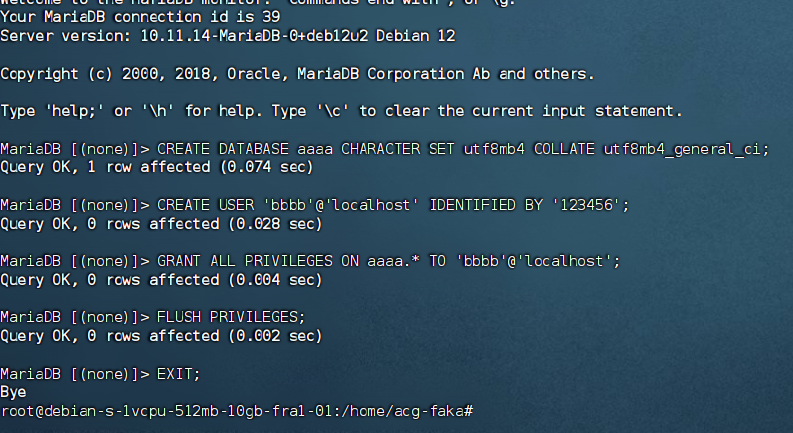
aaaa → 数据库名称
bbbb → 数据库账号
123456 → 数据库密码
4️⃣ 配置 Nginx
创建 Nginx 配置:
sudo nano /etc/nginx/sites-available/acg-faka.conf内容示例:
server {
    listen 80;
    server_name yourdomain.com;   # 替换为你的域名

    root /home/acg-faka;
    index index.php index.html;

    location / {
        if (!-e $request_filename) {
            rewrite ^(.*)$ /index.php?s=$1 last;
        }
    }

    location ~ \.php$ {
        include snippets/fastcgi-php.conf;
        fastcgi_pass unix:/run/php/php8.2-fpm.sock;
    }

    location ~ /\.ht {
        deny all;
    }
}
启用并重载:
sudo ln -sf /etc/nginx/sites-available/acg-faka.conf /etc/nginx/sites-enabled/acg-faka.conf
sudo nginx -t
sudo systemctl reload nginx
5️⃣ 配置 HTTPS(acme.sh)
安装 acme.sh:
curl https://get.acme.sh | sh
source ~/.bashrc
申请证书:
sudo systemctl stop nginx~/.acme.sh/acme.sh --register-account -m your_email@example.com \
curl https://get.acme.sh | sh
~/.acme.sh/acme.sh --register-account -m your_email@example.com --issue -d 你的域名 --standalone --key-file /home/certs/key.pem --cert-file /home/certs/cert.pem --force~/.acme.sh/acme.sh --installcert -d 你的域名 --key-file /home/certs/key.pem --fullchain-file /home/certs/cert.pemsudo systemctl start nginxHTTPS Nginx 配置:
sudo nano /etc/nginx/sites-available/acg-faka.conf
server {
    listen 443 ssl;
    server_name yourdomain.com;

    root /home/acg-faka;
    index index.php index.html;

    ssl_certificate /home/certs/cert.pem;
    ssl_certificate_key /home/certs/key.pem;

    location / {
        try_files $uri $uri/ /index.php?$query_string;
    }

    location ~ \.php$ {
        include snippets/fastcgi-php.conf;
        fastcgi_pass unix:/run/php/php8.2-fpm.sock;
    }

    location ~ /\.ht {
        deny all;
    }
}

server {
    listen 80;
    server_name yourdomain.com;
    return 301 https://$host$request_uri;
}
mkdir -p /var/log/nginx
chown -R www-data:adm /var/log/nginx
systemctl restart nginx
重载 Nginx:
sudo nginx -t
sudo systemctl reload nginx
6️⃣ 设置证书自动续期
创建脚本 /home/acg-faka/renew_acg_cert.sh:
#!/bin/bash
export PATH="/root/.acme.sh:$PATH"

/root/.acme.sh/acme.sh --renew -d yourdomain.com \
  --key-file /home/certs/key.pem \
  --fullchain-file /home/certs/cert.pem \
  --force \
  --reloadcmd "systemctl reload nginx"
赋权:
sudo chmod +x /home/acg-faka/renew_acg_cert.sh添加 cron(每 3 个月自动执行一次):
sudo crontab -e添加:
0 3 1 */3 * /home/acg-faka/renew_acg_cert.sh >> /var/log/acg_cert_renew.log 2>&17️⃣ 安装 acg-faka
访问:
环境检查通过后,填写数据库信息:
主机:127.0.0.1
数据库名称:aaaa
数据库账号:bbbb
密码:123456
数据表前缀:acg_
设置管理员账号
安装完成后访问后台: