
让你的小米路由器自动登录公司外网
- 建站相关
- 2026-02-03
- 373热度
- 0评论
路由自动登录外网
调试了小米ax5jdc,由于公司外网每天都要登录,go了个小程序,让路由器自动登录。关键是提取登录密码,登录界面按f12,找到
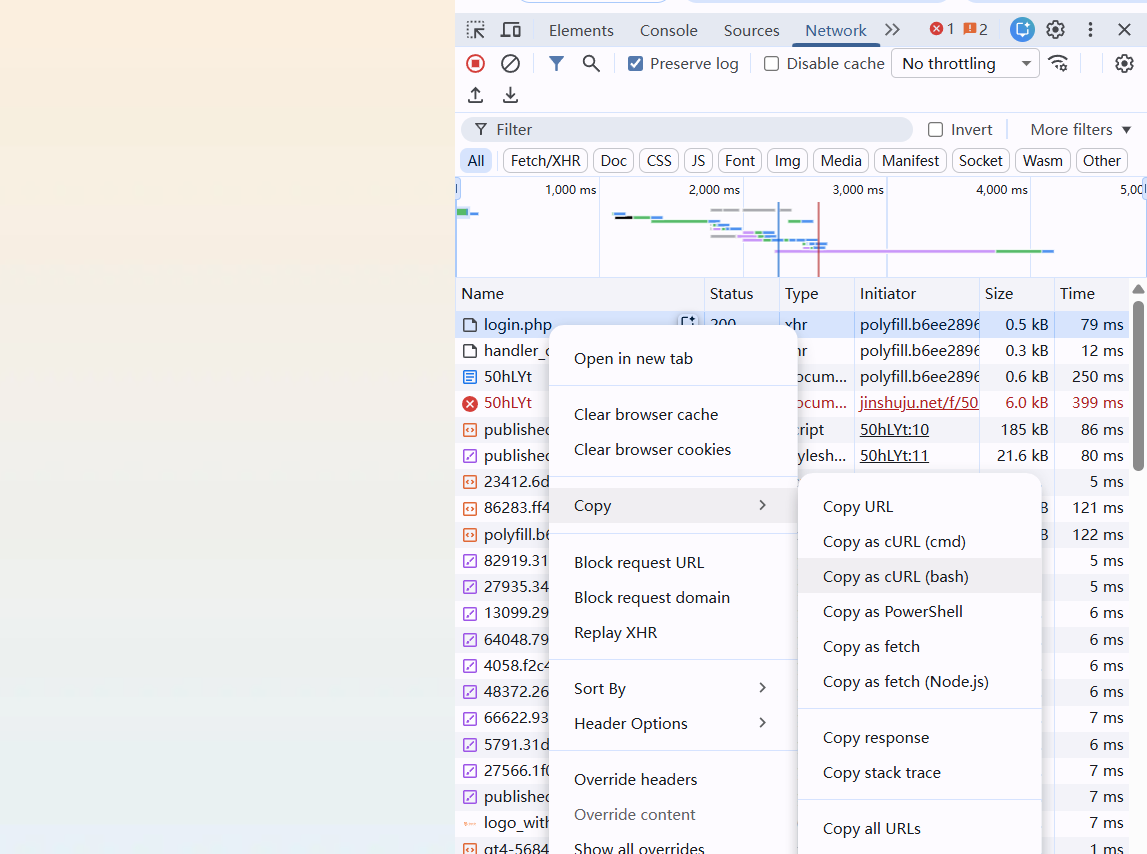
,复制代码
curl 'http://192.168.3.1/ac_portal/login.php' \
-H 'Referer: http://192.168.3.1/ac_portal/default/pc.html?template=default&tabs=pwd&vlanid=0&_ID_=0&switch_url=&url=http://192.168.3.1/homepage/index.html&controller_type=&mac=8c-de-f9-1c-0a-dd' \
-H 'X-Requested-With: XMLHttpRequest' \
-H 'User-Agent: Mozilla/5.0 (Windows NT 10.0; Win64; x64) AppleWebKit/537.36 (KHTML, like Gecko) Chrome/144.0.0.0 Safari/537.36' \
-H 'Accept: /' \
-H 'Content-Type: application/x-www-form-urlencoded; charset=UTF-8' \
--data-raw 'opr=pwdLogin&userName=账号&pwd=ffb3188bc31e&auth_tag=1770105787257&rememberPwd=0' \
--insecure
得到登录密码和对应的时间,这两个是对应的,相当于配对
go源码直接见仓库
https://github.com/yzhpxd/automatically-login-network./blob/main/RouterLogin.go然后生成路由用的go程序
# 1. 设置目标操作系统为 Linux
$env:GOOS = "linux"
# 2. 设置目标架构为 32位 ARM
$env:GOARCH = "arm"
# 3. 关键:设置 ARM 版本为 v7 (对应 armv7l)
$env:GOARM = "7"
 # 4. 编译 (生成名为 auto_login 的文件)
go build -ldflags="-s -w" -o auto_login RouterLogin.go
上传路由
后台运行
nohup /jdcstorage/auto_login > /dev/null 2>&1 & 或
我的路由只能用( )才能后台
( /jdcstorage/auto_login > /dev/null 2>&1 & )在自启中添加 ( /jdcstorage/auto_login > /dev/null 2>&1 & )
我的路由 /etc/rc.local